Save Investment Scenarios Before You Invest
When you save investment scenarios, you stop treating each calculator result as a one-time answer. You create a reusable record of the assumptions, tradeoffs, and decisions behind a portfolio plan.
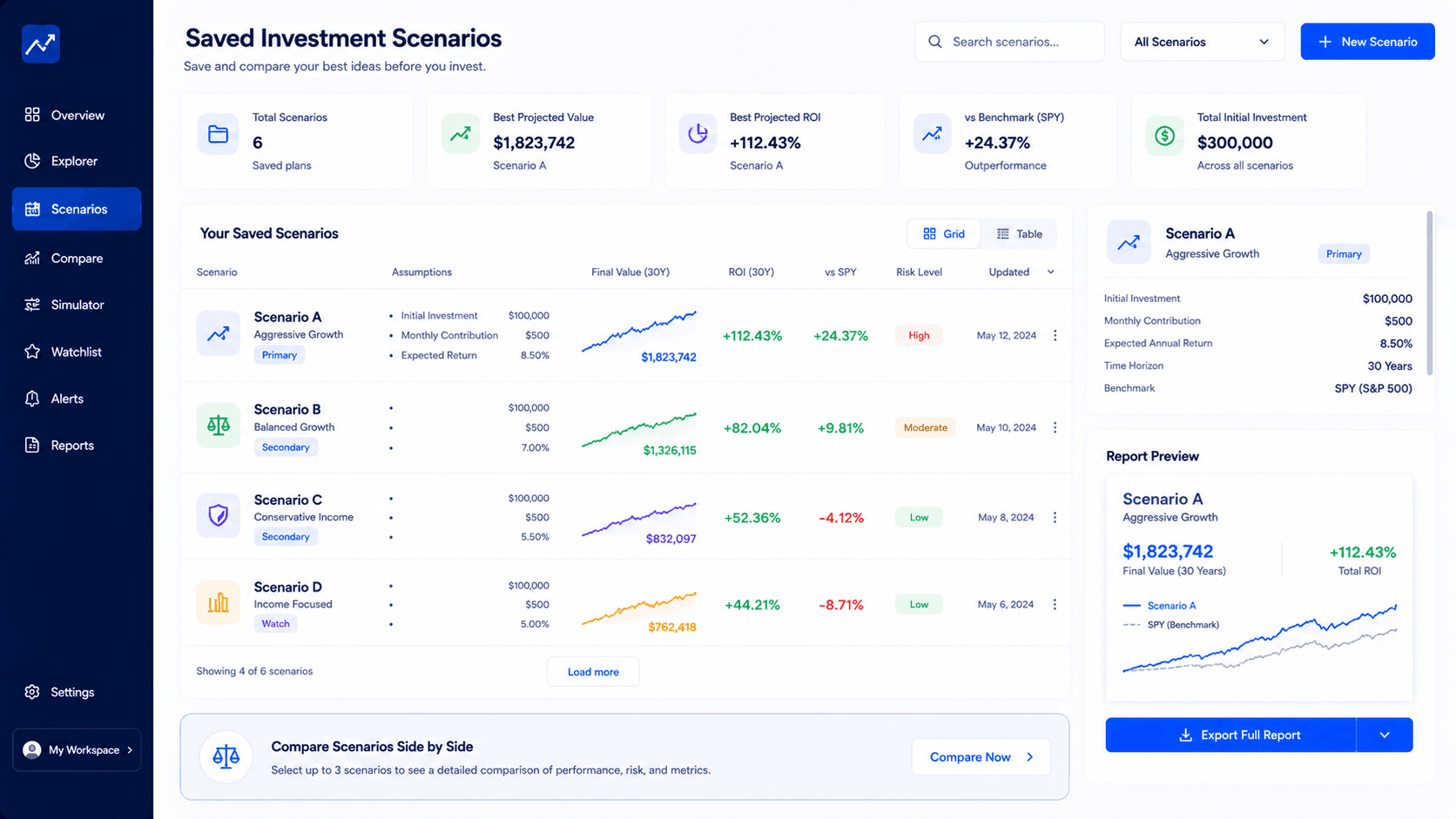
Why save investment scenarios?
To save investment scenarios is to preserve the assumptions behind an investing decision so you can compare them later. A scenario can include the starting amount, monthly contribution, date range, asset choice, benchmark, fees, withdrawals, rebalancing rule, and notes about why the plan was tested.
This matters because most investing mistakes do not come from one bad number. They come from changing the question halfway through the process. One day you compare SPY with QQQ. The next day you change the contribution amount. Then you switch the date range. Without a saved scenario, you may think you are comparing strategies, while you are actually comparing different assumptions.
The simple rule is this: use a free simulator when you need one quick test, and use a saved scenario workflow when the decision will be revisited. If the plan involves several portfolios, benchmarks, fees, exports or a report you want to keep, compare the Premium workflow through the pricing page.
Saved scenarios turn investing from memory into process
A portfolio decision often looks simple when it is written as one final number. One scenario ends at $184,000. Another ends at $211,000. A third has a lower drawdown. But the number is not the full decision. The real decision is the relationship between contribution behavior, time, risk, benchmark performance, fees and your ability to stick with the plan.
That is why the ability to save investment scenarios matters. It creates a record of what you were actually testing. If you compare a lump sum strategy with a DCA strategy, the saved version should preserve the start date, end date, contribution amount, selected assets, weights and benchmark. If you come back a week later, you should not need to reconstruct the plan from memory.
Memory is a weak planning tool. Investors often remember the result they liked, but forget the assumptions that created it. A scenario may have looked strong because the test started after a crash, because the contribution amount was too high, or because the benchmark period favored one asset. Saved scenarios help expose those details.
There is also a product reason. WhatIfInvested is not meant to be only a blog or a one-off calculator. The platform is built around Simulate, Compare and Understand. Saving scenarios supports all three. You simulate a plan, compare it with alternatives, then understand why one path looks more realistic than another.
For a user, this is a calmer way to work. Instead of trying to remember what changed, the saved version becomes a reference point. You can duplicate it, change one variable, and see whether the new result actually improves the decision. That is much better than opening a calculator again and trying to rebuild a plan from memory.
What should be saved inside an investment scenario?
A useful saved investment scenario is more than a title. It should preserve the assumptions that would change the result if you changed them. At minimum, it should store the asset or portfolio, starting capital, contribution amount, contribution frequency, start date, end date, strategy mode, benchmark and the key output metrics.
For a simple free test, a screenshot or note can be enough. For a serious planning workflow, the scenario should be reloadable. Reloading matters because the value is not only documentation. The value is iteration. You want to open the old plan, duplicate it, change one variable and compare the outcome.
| Scenario field | Why it matters | Example |
|---|---|---|
| Scenario name | Prevents confusion when you return later. | SPY DCA 10Y baseline |
| Assets and weights | Shows whether the result came from one asset or a diversified mix. | 60% SPY, 25% QQQ, 15% SCHD |
| Contribution plan | Separates market performance from savings behavior. | $500 monthly |
| Date range | Controls the market regime being tested. | 2016 to 2026 |
| Benchmark | Shows whether the plan beat a simple reference. | SPY benchmark |
| Notes | Captures why the scenario was created. | Test lower drawdown alternative |
If you use an external reference for future value math, compare the logic with a reliable educational calculator such as the Investor.gov compound interest calculator. Then use WhatIfInvested when you need historical context, scenario comparison and Premium-style planning structure.
Seven useful scenarios worth saving
The best reason to save investment scenarios is not to create a giant archive. It is to keep the few comparisons that actually clarify a decision. A small scenario library is more useful than a cluttered one. The right saved scenarios should help you understand how contribution behavior, asset choice, timing, benchmark performance and risk tolerance interact.
Think of each scenario as a question. If the question is weak, the saved scenario will be weak too. If the question is strong, the saved scenario becomes a repeatable research asset. Below are seven scenario types that fit the WhatIfInvested workflow and connect naturally to free tools, Premium planning and portfolio comparison.
1. Baseline market scenario
Save a simple broad-market baseline such as SPY or VOO with a realistic monthly contribution. This becomes the reference point for every more complex idea. If a custom portfolio cannot clearly improve on this baseline, the extra complexity needs a good reason.
2. Higher contribution scenario
Duplicate the baseline and raise the monthly contribution. This helps separate investment return from savings behavior. Many investors focus on asset selection, but the contribution amount may explain more of the final result than the ticker choice.
3. Lower risk scenario
Test a more diversified or defensive allocation. The goal is not only a higher final value, but a smoother path you could actually follow. A lower ending balance can still be a better scenario if the risk profile makes the plan more realistic.
4. Growth tilt scenario
Add a growth-oriented asset such as QQQ or a tech-heavy allocation. Compare final value against drawdown and benchmark behavior. A growth tilt may look attractive, but the saved scenario should show whether the extra volatility was worth it.
5. Crisis start scenario
Use a difficult market start date such as 2008 or 2020. This shows whether the plan survives stress, not only whether it looks good in calm periods. If a strategy only works in friendly periods, the saved scenario should make that limitation visible.
6. Benchmark challenge
Save a version that compares your chosen portfolio with SPY or another simple reference. If complexity does not beat the benchmark, the reason for complexity should be clear: lower risk, different income profile, diversification, tax planning, or personal preference.
7. Goal gap scenario
Save a version that shows the gap between the current contribution and a future goal. This is useful because it turns a vague goal into a practical planning question. The user can see whether the issue is return, time, contribution level, or risk.
These examples show why the keyword save investment scenarios is connected to conversion. The user is not merely reading about a feature. They are learning a planning behavior. The more serious the behavior becomes, the more natural Premium feels.
A practical scorecard for saved scenarios
Before you trust a saved scenario, score it. A simple scorecard keeps the comparison honest. It also prevents the common mistake of choosing the scenario with the biggest final value while ignoring whether the assumptions were realistic.
A saved scenario should answer five questions. First, is the contribution amount realistic? Second, is the time horizon meaningful? Third, is the asset mix understandable? Fourth, is there a benchmark? Fifth, does the risk profile match the reason for the scenario? If the answer is weak, the scenario should either be improved or removed from the decision set.
| Question | Good scenario | Weak scenario |
|---|---|---|
| Contribution realism | Uses an amount the investor could actually repeat. | Uses an amount that only works on paper. |
| Time horizon | Matches the decision being tested. | Uses a random date range because the result looks better. |
| Asset logic | Each holding has a clear role. | Assets are added because they recently performed well. |
| Benchmark | Compares against a simple reference. | No benchmark, so complexity cannot be judged. |
| Risk fit | Drawdown is considered before choosing the winner. | Only final value matters. |
This scorecard is useful even if you are using a free tool. You can write down the answers manually. But when you need to save investment scenarios repeatedly, duplicate them and export them, the workflow starts to justify a Premium planning environment.
The scorecard also keeps the article grounded in user experience. It reminds the reader that a saved scenario is not valuable because it exists. It is valuable because it makes a decision easier to review. That distinction is important for a financial SaaS product, because the user should feel more in control, not more overwhelmed.
The repeatable process: save, duplicate, change, compare
A good scenario workflow is simple. Save the baseline. Duplicate it. Change one variable. Compare the result. Repeat only when the next variation teaches something useful. This process is more important than having dozens of features.
For example, assume your baseline is SPY monthly DCA from 2016 to 2026 with $500 per month. Save it. Then duplicate it and test QQQ. Duplicate again and test a 70/30 SPY/QQQ portfolio. Duplicate again and test a smaller contribution. Duplicate again and test a crisis-heavy start date. Now you have a decision library that explains the tradeoff between market exposure, contribution level and risk.
The same process works for Canadian ETF decisions. You might save a VFV scenario, a VEQT scenario, an XEQT scenario and a mixed allocation. The value is not that one ticker is always best. The value is seeing how each plan behaves under the same contribution and period assumptions.
Free tools are ideal at the beginning because they reduce friction. The user can test the first idea quickly. Premium becomes relevant when the same person wants continuity: saved plans, duplicated assumptions, benchmark comparison, exports, notes and a cleaner decision trail. That is the natural funnel from article to simulator to pricing.
When a saved scenario should become a report
Not every simulation deserves a report. A quick curiosity test can stay lightweight. But a scenario should become a report when the decision has consequences: changing contribution amounts, choosing between portfolios, comparing retirement assumptions, deciding whether complexity is worth it, or explaining the plan to someone else.
A report should not be a pile of screenshots. It should summarize the decision. What was tested? What assumptions were used? Which scenario won by final value? Which scenario had lower drawdown? Did the benchmark outperform? Were fees meaningful? What is the practical conclusion?
This is where saved scenarios, exports and Premium reporting reinforce each other. Saving preserves the assumptions. Exporting preserves the result. A report turns the result into a decision artifact. That combination is much more valuable than a calculator that only displays numbers while the tab is open.
If WhatIfInvested is used as a serious planning platform, the strongest user path is not "calculate once and leave." The stronger path is "test a plan, save it, compare alternatives, export the best version, and return when assumptions change." That path supports both product value and recurring subscription value.
Why saved scenarios increase Premium value
Premium value is not only more inputs. More inputs can actually make a tool feel heavier if the user does not understand what to do next. The strongest Premium value comes from turning complex inputs into a repeatable decision system. Saved scenarios are central to that system.
When a user pays, they are not only paying to enter more data. They are paying to avoid losing work, compare alternatives faster and make the planning process feel organized. Scenario saving supports retention because users have a reason to return: their previous assumptions are still there.
This is also why public article CTAs should point to pricing rather than a protected member page. A visitor first needs to understand the Premium promise. The protected tools page should come after login, not as the public sales destination.
For conversion, the message should be direct: the free simulator helps you test an idea; Premium helps you build a reusable decision workspace. The user should not feel pushed toward a paid tool too early. They should understand why the paid version becomes useful once the planning process becomes repeated, comparative and report-ready.
Checklist before you save investment scenarios
Use this checklist before you save investment scenarios that might influence a real decision. It keeps the workflow clean and makes the saved result easier to trust later. The goal is not to make the process complicated. The goal is to make sure each saved scenario has a reason to exist.
- Define the question. Before you save investment scenarios, write the decision in plain language: compare two ETFs, test a contribution level, benchmark a portfolio, or review a risk tradeoff.
- Use realistic inputs. A saved scenario is only useful if the contribution, timeline and asset mix are plausible. Unrealistic inputs create confidence without discipline.
- Add a benchmark. If possible, compare against a simple reference such as SPY. This shows whether the extra work improved the outcome or only made the plan look more complex.
- Keep the note short. A one-sentence note is enough: why this scenario was saved, what changed, and what decision it supports.
- Review drawdown. A scenario that wins by final value may still be difficult to hold. Save investment scenarios with the risk context, not only the ending balance.
This checklist also helps decide when free tools are enough. If you only need one answer, the free simulator is usually the right place to start. If you need to save investment scenarios, duplicate them, compare them and come back later, the planning problem is no longer a one-time calculation.
For WhatIfInvested, this distinction is important. The public article teaches the behavior. The free tool gives the first result. Premium becomes relevant when the user wants to keep the scenario library, compare several versions and export a decision-ready report. That is a stronger conversion path than simply saying that Premium has more features.
In other words, save investment scenarios when the decision deserves continuity. Save investment scenarios when the assumptions may change. Save investment scenarios when you want to compare the same plan under multiple market conditions. And save investment scenarios when you want a repeatable process instead of a scattered collection of disconnected calculations.
Common mistakes when saving investment scenarios
Saving too many weak scenarios
More saved scenarios does not automatically mean better planning. If every small idea is saved, the library becomes noisy. Save scenarios that answer a real question: different asset mix, different contribution level, different risk profile, different benchmark or different goal.
Ignoring the reason for the scenario
A scenario without a note can become confusing later. Add a short reason. For example: "test whether lower drawdown is worth lower final value" or "compare SPY against a dividend-heavy portfolio." That reason gives the result context.
Comparing final value only
Final value is easy to understand, but it is incomplete. A plan can end higher because it took more risk, concentrated in one asset or benefited from a favorable date range. Compare ROI, drawdown, benchmark result, fees and concentration before deciding.
Forgetting that historical data is not a forecast
A saved investment scenario is a decision aid, not a prediction. It helps you understand what happened under specific assumptions. It does not guarantee that the next decade will behave like the last decade.
Where this fits in the WhatIfInvested system
Start with the Investment Simulator when you want historical context. Use compare investment strategies when you are deciding between methods. Use compound growth vs DCA when the question is which calculator fits the job. Use investment simulator assets when you need ideas for what to test.
Save investment scenarios when the work becomes repeatable. That is the bridge from casual exploration to a serious planning process. It is also one of the clearest reasons to compare Premium access, because scenario saving turns individual tests into a decision library.
How often should you review saved scenarios?
You do not need to review every saved scenario every week. That would turn the workflow into noise. A better approach is to review saved scenarios when one of the real assumptions changes. That might be a higher monthly contribution, a new investment goal, a different account type, a major market drawdown, a change in risk tolerance, or a decision to compare Premium planning tools.
A quarterly review is enough for many long-term investors. During that review, do not ask whether the market moved exactly as expected. Ask whether the plan still represents the question you wanted to answer. If the scenario was saved to compare DCA and lump sum, keep that focus. If it was saved to compare SPY against a custom portfolio, keep the benchmark comparison clean.
This is where the ability to save investment scenarios becomes practical. A scenario library gives you continuity. Instead of trying to remember what you tested three months ago, you can return to the same assumptions and decide whether the next change is meaningful.
Why saved scenarios make users come back
The strongest financial tools are not only useful once. They create a reason to return. A mortgage calculator may answer one question and be forgotten. A portfolio planning workspace becomes more valuable when it remembers the user's best assumptions. That is why saved scenarios are not just a convenience feature. They are a retention feature.
If a user can save investment scenarios, the next visit has context. They can compare a new ETF against an old baseline. They can test whether a higher contribution closes the gap to a goal. They can duplicate a saved plan and change only the benchmark. That continuity makes the product feel like a workspace rather than a disposable calculator.
This matters for WhatIfInvested because the platform is built around repeat decisions. Investors do not only ask one question. They ask: what if I invested monthly, what if I started earlier, what if I chose a different ETF, what if I used a benchmark, what if inflation or fees reduce the result, what if the drawdown is too high? Saved scenarios make those questions easier to connect.
That is also why the Premium offer should not be framed as "more complicated inputs." It should be framed as a better decision environment. Premium is valuable when the user wants to save investment scenarios, compare them, export them, and return later without rebuilding the same research. The feature is technical, but the benefit is emotional: less friction, less lost work, more confidence.
Which saved scenarios should you keep?
A good scenario library is selective. You do not need to keep every test. Keep the scenarios that still answer an active question, explain a real tradeoff, or serve as a baseline for future comparison. Remove or ignore scenarios that were created from curiosity but no longer support a decision.
There are three scenarios worth keeping almost all the time. First, keep the baseline. This is the plain version of the plan, often a broad ETF, realistic monthly contribution and long time horizon. Second, keep the strongest alternative. This might be a growth tilt, a lower-risk allocation, or a different contribution schedule. Third, keep the stress test. This shows how the plan behaved during a hard period.
Everything else should earn its place. If two saved scenarios are almost identical, keep the clearer one. If a scenario uses unrealistic contributions, rename it as a stretch case or remove it from the main decision set. If a scenario depends on a date range chosen only because it makes the result look good, treat it as research, not a decision.
This cleanup habit keeps the act of saving scenarios valuable. The goal is not to collect outputs. The goal is to preserve the few comparisons that make the next decision easier. When you save investment scenarios with that discipline, the library becomes a planning asset instead of another messy folder. Clarity compounds too.
FAQ about saved investment scenarios
What does it mean to save investment scenarios?
To save investment scenarios means keeping the assumptions and results of an investment simulation so you can review, duplicate or compare the plan later.
Can I save investment scenarios with free tools?
Free tools are best for quick tests. You can manually note results, but a true saved scenario workflow is more useful when you need to reload assumptions, compare alternatives and export reports.
What should I include in a saved investment scenario?
Include the asset or portfolio, weights, contribution amount, date range, strategy mode, benchmark, key results and a short note explaining why the scenario was created.
Why are saved scenarios useful for Premium users?
Saved scenarios make Premium more valuable because users can build a decision library, return to previous assumptions, compare portfolios and avoid rebuilding the same analysis repeatedly.
Should I compare scenarios by final value only?
No. Final value is useful, but you should also compare ROI, drawdown, benchmark performance, fees, concentration and whether the plan is realistic to follow.
Is a saved scenario financial advice?
No. A saved scenario is an educational planning record based on selected assumptions and historical data. It does not provide personalized financial advice or guarantee future returns.
Build a decision library, not just another calculation
Use the free simulator for your first test. When the same question becomes a repeatable planning workflow, saved scenarios help you compare, revisit and explain the decision with more confidence.